
666H Mission Bonus gives users a simple way to turn everyday app activity into extra promotional value. Instead of waiting for one large campaign, players can open the mission area, complete the task shown on screen, and collect the reward linked with that activity. This makes the earning side of the platform feel more active because there is always something useful to check.
For regular 666H Game Download users, missions can fit naturally around normal play. A user can review the current task, complete it at a comfortable pace, and return to the rewards area to see progress without jumping between different sections.
What Is 666H Mission Bonus?
666H Mission Bonus is a task-based promotion where users complete selected activities and receive account rewards after the required progress is finished. Missions can focus on simple actions such as logging in, exploring a game category, completing a set amount of activity, or taking part in a current promotional event.
The main attraction is clarity. Instead of guessing what comes next, users can see a target, follow the progress bar, and understand what reward is connected with that mission.
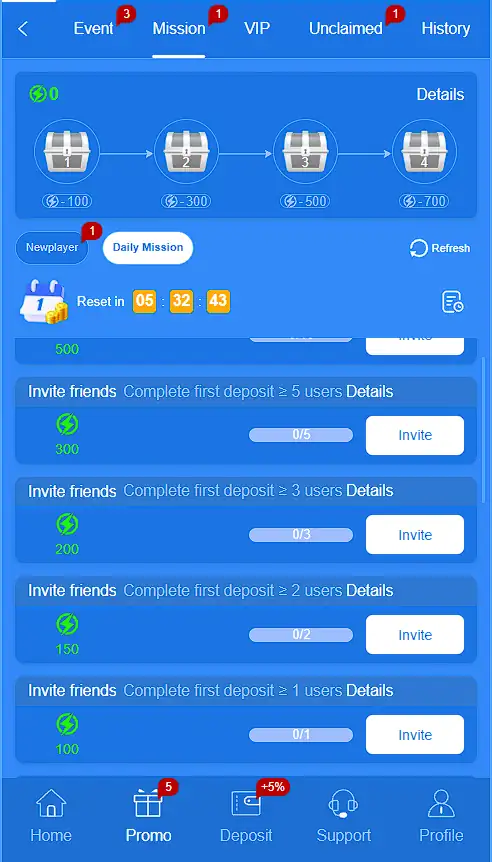
How the Mission System Works
The mission area usually brings the important details into one place: task name, progress, reward value, and claim status. This makes the system easier to follow for users who like promotions with a visible start and finish.
A simple mission journey looks like this:
- Open the Rewards or Mission section.
- Read the current task carefully.
- Complete the activity shown in the mission card.
- Return to the same section and check progress.
- Claim the reward after the mission shows as complete.
- Review the next task instead of starting several missions at once.
666H Game keeps this process easier to manage by placing account activity and promotional tools close together.
Types of Missions Users May See
Different missions can create different earning routes. Some tasks may focus on daily activity, while others can run for several days or connect with special events.
| Mission Type | What It Can Focus On | Why Users May Like It |
|---|---|---|
| Daily Mission | Short account activity | Quick progress and frequent rewards |
| Game Mission | Activity inside a selected category | Adds a target to normal play |
| Deposit Mission | Completing a payment-related task | Can connect wallet activity with promotions |
| Event Mission | Limited campaign activity | Adds variety during special promotions |
| Progress Mission | Reaching a target over time | Gives users a longer earning goal |
The exact mission card shown inside the account should always be treated as the current source for the task and reward amount.
Daily Missions and Short Reward Cycles
Daily missions can be especially attractive because they give users a reason to check the app regularly. A short mission can be completed without changing the whole gaming routine, which makes the reward feel like an extra benefit rather than a complicated campaign.
Mission Bonus vs Daily Check-In
A daily check-in reward normally focuses on opening the app or visiting the reward section on a regular basis. 666H Mission Bonus is different because it can ask the user to complete a specific activity before the reward is added.
This gives missions a more active earning style because users follow a clear action and completion target.
Mission Bonus vs Referral Rewards
Referral rewards are connected with invitations and new users joining through a referral route. Mission rewards are connected with tasks inside the account itself.
For 666H users, missions add another promotional path beyond referrals and make reward activity more varied.
How to Track Mission Progress Better
666H Mission Bonus becomes easier to use when users keep their reward activity organised. Checking the mission card before starting can prevent confusion later, especially when several promotions are running at the same time.
A quick screenshot of a completed task can also create a useful personal record before the reward is claimed.
Common Mission Problems
Sometimes a mission can look incomplete even after the user thinks the task is finished. The best first step is to reopen the mission card and compare the progress shown there with the activity already completed.
For 666H Mission Bonus, users should also check whether the task belongs to the current mission cycle, whether the claim button has appeared, and whether another requirement is still shown on screen.
Conclusion
666H Mission Bonus adds a simple task-and-reward system to the wider promotional experience. Users can see what needs to be completed, follow progress, claim the reward, and move to the next mission without making the process complicated.
For users who enjoy earning-focused features, 666H Mission Bonus creates a clear routine: check the task, complete the target, claim the reward, and review what comes next. 666H.com keeps these promotional tools inside the same account environment, making missions a practical way to add more value to regular mobile activity.
FAQs
What Is the Process to Collect 666H Mission Bonus?
Open the mission or rewards section, find the completed task, and use the claim option shown beside it. After claiming, check the reward balance or account history to confirm the update.
Can 666H Mission Bonus help me earn extra promotional rewards?
Yes. Missions are designed to add another reward route through task completion. The useful approach is to follow the target shown in the account and complete one mission at a time.
How Is 666H Mission Bonus Different From Referral Rewards?
No. Referral rewards depend on invitation activity, while missions focus on tasks completed inside the account. Both can support promotional earning, but they follow different paths.
Can I use JazzCash or Easypaisa with mission rewards?
JazzCash and Easypaisa are mainly used for supported wallet transactions. Mission rewards should first be checked inside the reward balance or promotion history before any withdrawal step.
How often should I check new missions?
Checking the mission section regularly is useful because daily and event-based tasks can change. A quick check before starting a session can help users notice a fresh earning opportunity.