
666H Reward Center gives players one place to check active promotions, completed tasks, pending claims, and reward history without jumping through different sections of the app. For users who enjoy earning-focused features, it makes bonus activity easier to follow because each reward can be viewed, claimed, and tracked from the same dashboard.
For regular 666H Game users, the reward area can become part of a simple routine: open the section, see what is ready, finish the required activity, and collect the value shown in the account. That keeps promotions organised while helping users notice offers they might otherwise miss.
What Is 666H Reward Center?
666H Reward Center is a promotional dashboard where users can view different reward types connected with their account. Depending on the current campaign, the area can show missions, events, VIP progress, unclaimed rewards, activity history, or other bonus opportunities.
Instead of checking several pages separately, users can return to one place and see which offers are active, which tasks are complete, and which rewards still need attention.
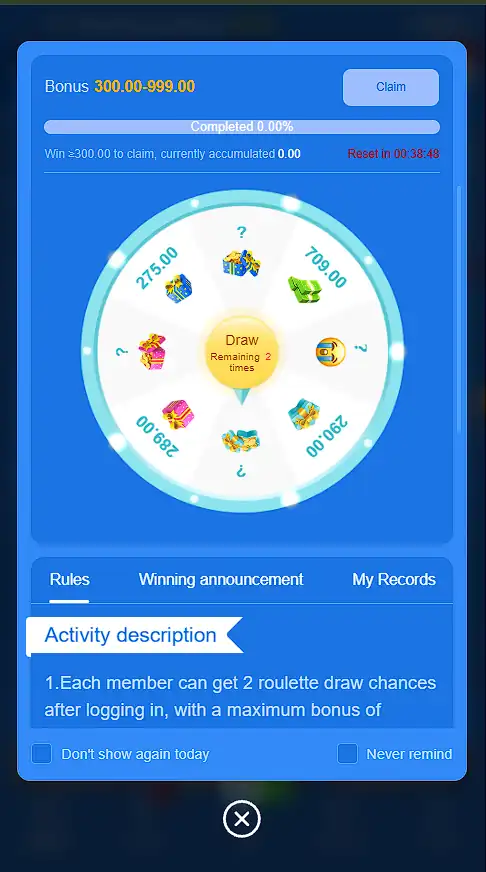
A Smarter Way to Find Active Promotions
This rewards dashboard is useful because it brings current campaigns into one organised view. A user can open the page and quickly understand whether a mission is still in progress, a reward is ready to collect, or a new event has appeared.
A simple routine can be:
- Open the rewards area.
- Check active missions or events.
- Review any unclaimed rewards.
- Open completed tasks one by one.
- Claim the available value.
- Recheck the reward history after the balance updates.
This approach keeps the process straightforward and avoids mixing several promotions together.
Do Not Leave Completed Rewards Unclaimed
666H Reward Center can help users spot rewards that are already completed but have not yet been collected. This is useful for players who take part in multiple promotions and do not want a finished task to be forgotten.
Before leaving the page, check the unclaimed section and confirm whether a claim button is available. Once collected, the reward should move into the account history or updated balance area.
Mission and Event Progress in One Place
Missions and limited-time events can feel confusing when progress is spread across different screens. 666H Reward Center makes this easier by giving users a single place to review task status and see what still needs to be completed.
| Reward Area | What Users Can Check |
|---|---|
| Missions | Current tasks and progress |
| Events | Limited promotional activities |
| Unclaimed | Rewards waiting to be collected |
| History | Previously credited rewards |
| VIP | Loyalty progress and level benefits |
For 666H Download users, this structure can make earning-focused activity feel more organised without turning every reward into a separate process.
Reward History Shows What You Already Earned
The rewards dashboard is not only about finding new offers. Reward history can also help users confirm what has already been credited, which promotion produced the value, and when the account was updated.
This is especially useful when several offers run close together. A quick look at history can separate a mission reward from a VIP benefit, event prize, or another promotional credit.
Keep an Eye on VIP Progress
The same dashboard can also act as a useful place to review loyalty progress. Users who are moving through VIP levels can check whether a new stage, reward, or benefit has appeared without opening unrelated account sections.
The best approach is to focus on the level currently shown in the account, read the reward details, and then decide which promotion is worth following next.
How to Claim Rewards Without Confusion
Claiming from 666H Reward Center should stay simple. Complete the required activity first, wait for the task to show as finished, and then use the claim option attached to that reward.
Helpful habits include:
- claim one completed reward at a time;
- check the updated balance after each claim;
- keep a screenshot of larger rewards;
- avoid repeatedly pressing the same claim button;
- review reward history before starting another offer.
666 H keeps the promotional side easier to manage when users treat each reward as a separate item rather than trying to claim everything at once.
Reward Center vs General Bonus Page
666H Reward Center and a normal bonus page are not exactly the same. A bonus page usually explains available promotions, while the reward center is more about account-level progress, claim status, history, and current tasks.
That difference is useful because one page tells users what promotions exist, while the other helps them manage rewards already connected with their own account.
What to Do When the Reward Dashboard Does Not Update
If 666H Reward Center does not update immediately, start by refreshing the page and checking whether the task status has changed. A reward can sometimes appear in history before the main balance visibly refreshes.
Users should also check that the correct promotion was completed and that the task belongs to the current cycle. If a completed reward still does not appear, keep a screenshot of the status and use the support option shown inside the account.
FAQs
How can I earn more through 666H Reward Center?
Check missions, events, VIP progress, and unclaimed rewards regularly. Completing the tasks already shown in your account is the simplest way to discover extra promotional value.
Where do completed rewards appear?
Open the reward history or account balance after claiming. The completed entry should show the promotion name, reward value, or updated status connected with the claim.
Can JazzCash or Easypaisa be used after claiming a reward?
JazzCash and Easypaisa can be used for supported account transactions, while reward value should first appear inside the account balance or promotional history before any payment step.
Is 666H Reward Center useful for new users?
Yes. New users can use it to understand how missions, events, VIP rewards, and claimable promotions are organised without searching across several parts of the app.
What should I check before claiming a reward?
Make sure the task is marked complete, confirm the reward shown on screen, and review the balance after claiming so you know the credit was added correctly.
Conclusion
666H Reward Center gives users a practical way to bring missions, event rewards, VIP progress, unclaimed bonuses, and reward history into one organised place. For players who enjoy promotional earning features, this can make it easier to see what is ready, what is still in progress, and what has already been collected.
Instead of chasing every offer separately, users can build a simple habit around the rewards dashboard: check progress, finish the task, claim the value, and review the result. 666H Reward Center becomes more useful when it is treated as the main control point for promotional activity, helping users get more value from the rewards already connected with their account.